


Implementation services included in the agreement with Handyman
As a Handyman customer, you will work with experienced field service consultants who guide you through the onboarding process.

The onboarding process
Handyman’s onboarding and implementation services are delivered by our Onboarding team. Through many years of experience with implementations and go-lives, combined with our domain experts’ close dialogue with the market, we have built a strong foundation of best practices.
Our onboarding process is structured across 4 phases, before you’re safely handed over to our Support. Each of the four project phases contains a set of activities. Turquoise activities are included in the agreed project scope. Once the standard implementation has been completed and reviewed, any additional customer-specific requirements are defined, scoped, estimated, and approved separately before being delivered through a custom implementation.
Standard
Covers everything needed to go live with a standard setup. Scope, activities, and timelines are predefined per subscription, including super user training, go-live, and process documentation.
Custom
Customer-specific configurations defined and agreed after Standard implementation. This may include extension of custom subscriptions, scope, data migration, extended training or go-live support, and other adjustments. Custom scope is estimated separately and does not replace the Standard implementation.
[Graphic: Implementation-EN.png – onboarding phases overview]
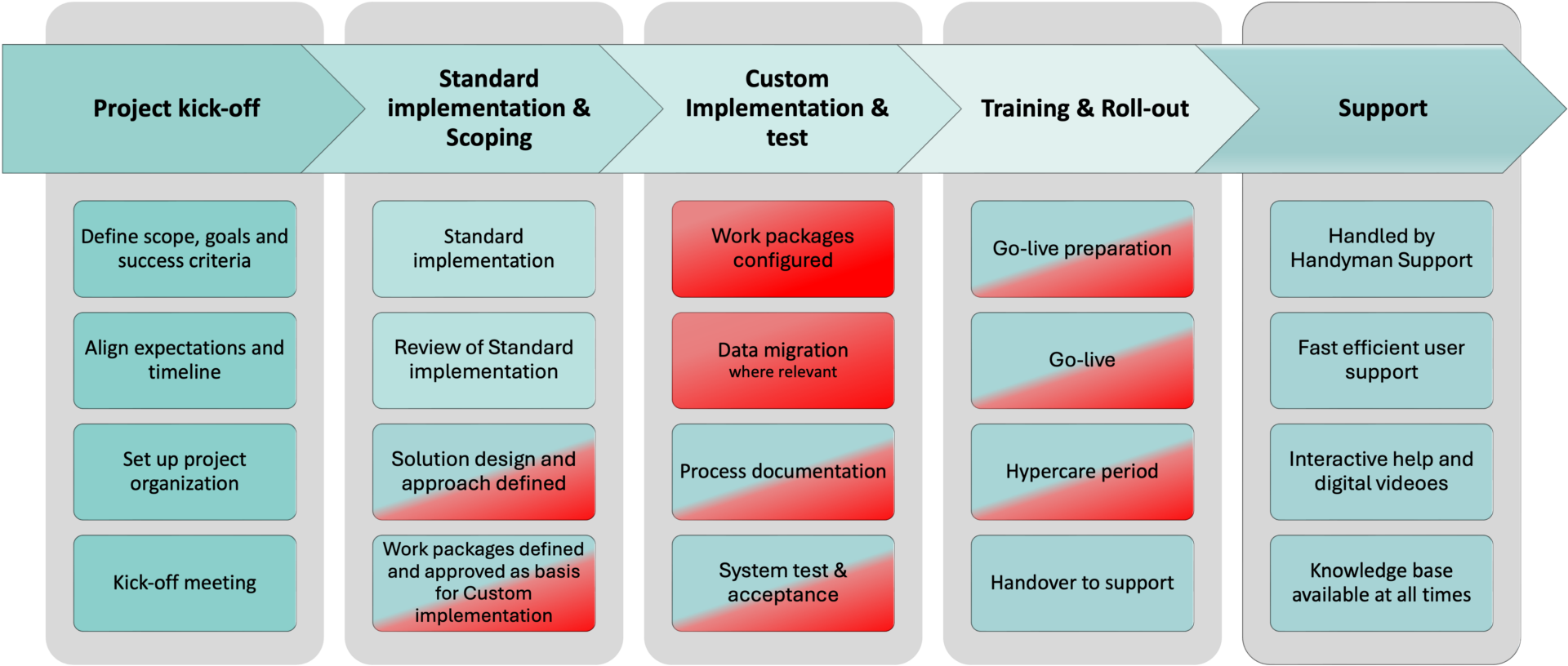
Each onboarding follows a defined project model with clearly defined roles and responsibilities between the customer and Handyman.
Standard implementation
For modules with Standard implementation, Handyman’s consultant will assist the customer throughout the onboarding of Handyman’s standardized solution in accordance with best practices.
Organization of resources:
• GSG Handyman assigns one Project Manager responsible for delivery and progress on the GSG Handyman’s side.
• The customer designates a Project Manager responsible for resources and progress on the customer’s side.
• For a successful implementation, the customer must also provide employees with experience and decision-making authority in the following areas:
– Service back-office (quotations, order preparation, invoicing)
– Dispatching and scheduling
– Field service / service technicians
– Service management
Standard implementation descriptions for Handyman subscriptions
This section defines the standard implementation scope for each Handyman subscription. The table below forms the basis for implementation planning, delivery, and follow-up. Training sessions are conducted virtually for Super Users.
Any changes to scope, estimated time, or number of sessions beyond what is defined in this table must be handled through agreed change management procedures.
Subscription
Scope description
Handyman Office & Mobile
A project is typically delivered as outlined below, with flexibility to allocate time across activities based on the customer’s needs:
• One 2 hour working session covering Handyman, the current service process, and Basic Configuration of Handyman Office (customers, item catalogue, company, departments, users, cost elements, time registration, order categories, checklists, and employee groups) including validation of imported data.
• One 2 hour working session covering Handyman Mobile, the current service process and basic configuration of Handyman office.
• If data is not transferred from ERP: Customer data is imported in predefined format based on files provided by the customer. This includes data such as customers, wholesalers and items, employees, and salary codes.
• One 3 hour virtually training in Handyman Mobile and all standard modules included, for up to 10 super users.
• 1 hour of IT operations/support (not applicable to SaaS).
• 1 hour of hypercare period, one week after go-live.
• Installation of Handyman Office and Mobile is carried out by the customer using instructions provided by Handyman.
For multi-module projects, training and go-live support are delivered in one combined session.
Service – Basic
One working session for 2 hours is conducted to review Service Basic Setup (sites, equipment, and equipment categories), including validation of imported data.
For multi-module projects, training and go-live support are delivered in one combined session.
Service – Full
One working session for 3 hours is conducted to review Service Full Setup (Service Forms, Contracts), including validation of imported data.
For multi-module projects, training and go-live support are delivered in one combined session.
Resource planner
A working session for 1 hour is conducted to review Resource planner setup (Key system settings, planning views, resources, and availability).
For multi-module projects, training and go-live support are delivered in one combined session.
Customer Portal
One working session for 1 hours is conducted to review Customer Portal setup and performs basic configuration.
A two hour virtual training session is conducted for administrators and super users.
Store & ordering
One 2-hour working session is conducted to review the Store & ordering setup and perform standard configuration.
Only considered standard when delivered with an ERP integration. The standard setup depends on the data flow supported by the selected standard integration.
For multi-module projects, training and go-live support are delivered in one combined session.
Store & ordering is not recommended without an ERP integration. In such projects, the module is to be delivered as a custom implementation and will be scoped after the standard implementation is completed.
Migration to Cloud, empty database, excluding ERP integration
A consultant migrates the customer’s solution to the Handyman cloud environment with an empty database. This includes installing the customer tenant in the cloud platform, performing basic configuration, and verifying that the solution operates correctly in the new environment.
Standard migration does not include integrations with ERP systems or other third-party systems. The migration is completed with verification together with the customer in an one hour virtual session.
Migration to Cloud, with empty database including XML integration
A consultant migrates the customer’s solution to the Handyman cloud environment and establishes a standard XML integration with the customer’s system. This includes creating the customer tenant in the cloud platform, performing basic configuration, and installing and configuring the standard XML integration.
Standard migration and use of the standard integration setup without custom modifications. The migration is completed with verification together with the customer in an one hour virtual session.
Standard implementation descriptions for Handyman integrations
This section describes the general scope and responsibilities for integrations between Handyman and third-party systems.
Each integration is delivered according to its standard product description and supported data flow, without modifications. Handyman guides the customer through the Handyman-related configuration. The customer is responsible for providing the required access rights, credentials and information. Any work beyond the defined scope must be handled through the agreed change management procedure.
Integration
Scope description
Microsoft Dynamics 365 Business Central
Consultant guides the customer through the configuration required for the integration. The customer is responsible for ensuring that Handyman has the necessary access and that participants with the required ERP permissions attend the working session. The standard implementation follows the supported data flow described here.
Visma Business NXT
Consultant performs the standard configuration required for the integration, based on the supported data flow described here.
The customer is responsible for ensuring that Handyman has the necessary access and that participants with the required ERP permissions attend the working session.
Economics
Consultant performs the standard configuration required for the integration, based on the supported data flow described here.
The customer is responsible for ensuring that Handyman has the necessary access and that participants with the required ERP permissions attend the working session.
Tripletex
Consultant performs the standard configuration required for the integration, based on the supported data flow described here.
The customer is responsible for ensuring that Handyman has the necessary access and that participants with the required ERP permissions attend the working session.
Fortnox
Consultant performs the standard configuration required for the integration, based on the supported data flow described here.
The customer is responsible for ensuring that Handyman has the necessary access and that participants with the required ERP permissions attend the working session.
Contracting works
Consultant performs the standard configuration required for the integration, based on the supported data flow described here.
The customer is responsible for ensuring that Handyman has the necessary access and that participants with the required ERP permissions attend the working session.
Uniconta
Consultant performs the standard configuration required for the integration, based on the supported data flow described here.
The customer is responsible for ensuring that Handyman has the necessary access and that participants with the required ERP permissions attend the working session.
Lexware
Consultant performs the standard configuration required for the integration, based on the supported data flow described here.
The customer is responsible for ensuring that Handyman has the necessary access and that participants with the required ERP permissions attend the working session.
Selectline
Consultant performs the standard configuration required for the integration, based on the supported data flow.
The customer is responsible for ensuring that Handyman has the necessary access and that participants with the required ERP permissions attend the working session.
Custom implementation
Covers all deliveries beyond what is explicitly defined in the standard implementation. This includes, but is not limited to, modules not listed under the standard implementation, read/write access to external APIs, customer-specific integrations, and customer-specific requirements or specifications related to standard integrations.
Following completion of the standard implementation, a project group is established with resources from both the customer and Handyman. The composition depends on the scope and complexity. Scope, timeline, responsibilities and estimates are defined together with the customer and documented in the project plan.
Handyman’s consultants guide and advise the customer throughout the process to ensure that the solution supports the customer’s workflows and operational needs. This may include mapping routines and reviewing how work orders, time and materials, invoicing and field operations are handled. Where changes to existing routines are required, the consultant helps clarify the impact on technicians, supervisors and administrative staff.
Project model
The customer is responsible for ensuring that any required assistance and facilitation from third-party suppliers engaged by the customer is clarified and carried out in accordance with the agreed plan between the customer and Handyman.
Examples include integrations and data exchange that are to be established with systems provided by third-party vendors.
The written language for the delivery and documentation will be delivered in English. Meetings and training sessions are conducted digitally; however, on-site meetings may be offered as an additional service.
Regardless of implementation level, the customer must provide a recipient organization that is responsible for coordinating resources and ensuring progress on the customer’s side.